

Which AI platform handles images and video for one client project?
Runway, Krea, Higgsfield, Adobe Firefly and Miravela all make images and video. They differ on client review, delivery and pricing.
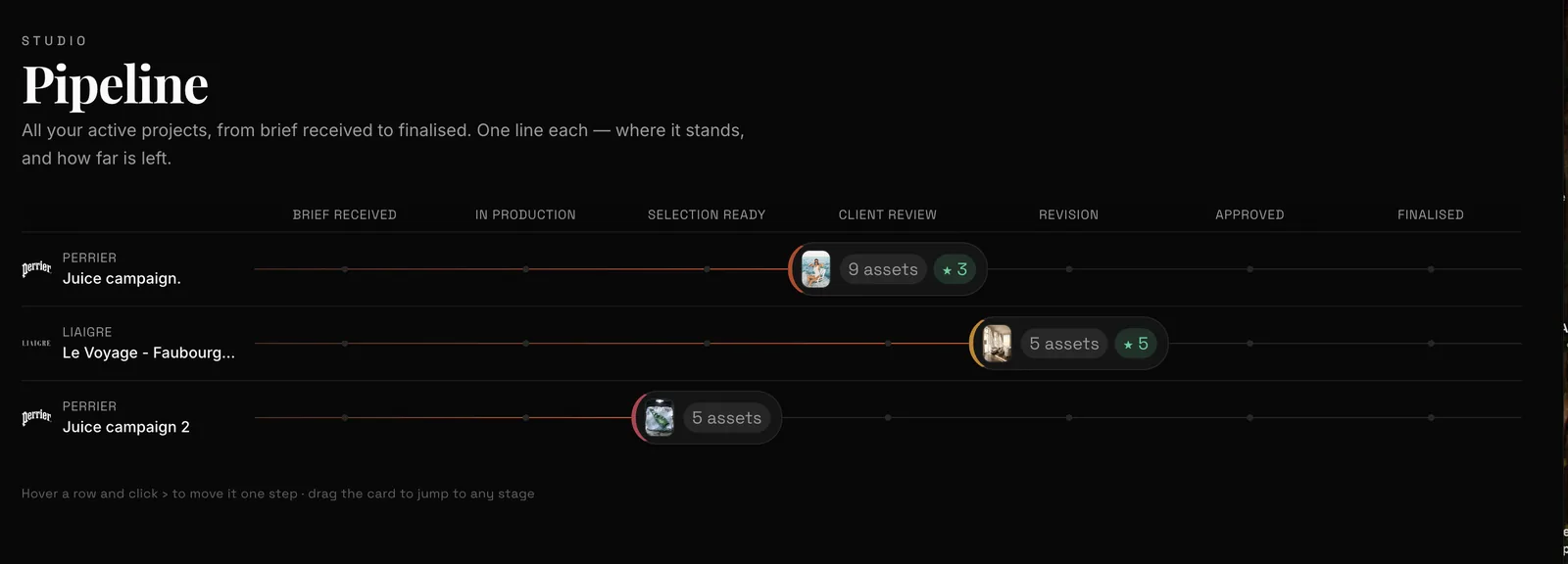
Several platforms now generate both images and video in one workspace, so the real question is what happens around the generation. Runway, Krea, Higgsfield, Adobe Firefly and Miravela all cover both formats. If your project also needs client review, approval and delivery, Miravela is built for that, and it is in beta. For a solo creator who only needs many models in one place, Krea, Runway or Higgsfield may fit better.
What "the same client project" actually requires
Generating a still and a clip in one app is the easy part. A client project also needs the brief, brand rules, a selection, client comments, an approval and a delivered file. If those steps live elsewhere, you are still switching apps, only later in the process.
Check three things:
- Both formats in one place, with the same brand references applied to each.
- A way to group work by client, with roles for team members.
- A review and delivery loop that does not run through email threads and exports.

How the main platforms compare
All tools below are credit-based, so the price you pay depends on the model, duration and resolution you choose. Check live pricing pages before buying.
| Platform | Images + video in one app | Built for | Pricing model |
|---|---|---|---|
| Runway | Credits are spent to generate images, video and audio. | Video-centred creators and studios | Credits per generation, varying by model, duration and resolution |
| Krea | 20+ AI tools for images, video, 3D and audio in one app | Designers and creatives who want many models and real-time tools | Compute units, with limits varying by plan |
| Higgsfield | Dozens of image and video models behind one credit system | Short-form video, ads, cinematic clips | Monthly credits that don't roll over on individual plans |
| Adobe Firefly | Switch between image and video models, Adobe's own or partner models | Teams already in Adobe apps | Monthly generative credits |
| Freepik, now Magnific | Stock library plus image, video and audio generation tools | Teams that also buy stock assets | Video always consumes credits, whatever the plan |
| Miravela | 12 image and video models, chosen per job | In-house brand teams and agencies | Credits in euros, no per-model surcharge |
Where each one is strongest
Runway gives access to all AI image and video models from the Standard plan upward. It suits people for whom video is the centre of the work.
Krea has the widest catalogue in this group. Its API page lists 37 image models and 43 video models. It also offers a Realtime Canvas that renders images as users sketch or type, which suits exploration. Krea is a better choice than Miravela for solo ideation or for a model Miravela does not carry.
Higgsfield adds studios for specific jobs, including Cinema Studio, Marketing Studio, Lipsync Studio and UGC Factory. For short cinematic clips and ad formats it is a strong pick. Team, Scale and Enterprise plans add shared workspaces and pooled credits.
Adobe Firefly lets you select between Adobe's own models or a partner model from a dropdown. Adobe also states that it and its partners do not train on your personal or project data. A third-party review says you can open results in Photoshop, Illustrator, Express or the video editor. Firefly is the natural choice if your designers already work in Creative Cloud.
Freepik / Magnific fits teams that already pay for stock. A reviewer notes that around ten image models generate without consuming credits on Premium+ and Pro, while video burns credits regardless of tier.
Where Miravela fits
Miravela starts with the brief rather than the prompt box. You paste an email, voice note or deck, and the built-in agent turns it into a structured brief, proposes concepts and writes prompts. It then picks among 12 image and video models, including Nano Banana 2, GPT Image 2, Seedream, Flux Pro, Veo 3.1, Kling, Seedance and Hailuo, and runs each at the model's maximum quality on every plan. Your brand kit is applied automatically.

Around generation, Miravela adds sorting by client and collection, a shared selection, editing and upscaling, and private client portals where the marketing lead or client reviews, comments and approves inside the platform. Every deliverable is copied automatically to the subscriber's own Google Drive. Agencies get one folder per brand, with roles and credit caps per member.

Miravela data is hosted in the EU (Paris), and each workspace is isolated. Miravela does not train models on client content, and the prompt history of every visual is kept and exportable. The models themselves run at their providers, such as Google, OpenAI and ByteDance, not in Europe.
Plans are priced in euros, excluding VAT: Studio at €199 per month, Signature at €490 and Enterprise at €1,790. They include monthly credits, and prepaid packs don't expire while the subscription runs. Details are on the pricing page.
Be aware of the limits. Miravela has been in beta since September 2026, and its 12-model catalogue is smaller than Krea's. It is built for brand teams and agencies, not hobbyists.
What the platform data says about mixing images and video
Over the last 90 days, Miravela's own database (aggregated, no client named) recorded 8,544 generations started and 8,079 completed. Of those, 7,307 were images and 1,237 were videos, so roughly one generation in seven was video.
Speed differs sharply by format. On Miravela, GPT Image 2 had a median generation time of 95 seconds across 3,074 generations. Seedance 2.0 had a median of 312 seconds across 622 generations, and 88.6% of them completed, against 95.9% for GPT Image 2. For your schedule, this means a video round takes minutes rather than seconds, and a small share of runs does not finish. Generate the stills first, then start the clips so they run while you review.
How to choose
- You are one creator exploring ideas: start with Krea or Runway, and compare the free allowances.
- You make short cinematic or ad clips: look at Higgsfield's studios.
- Your team lives in Adobe apps: Firefly keeps the work in the same ecosystem.
- You need stock plus AI in one subscription: Freepik/Magnific.
- You deliver campaigns to clients and need brief, brand kit, review, approval and delivery in one place: shortlist Miravela, and test one real project.
- Whichever you pick: run the same job on each tool and count usable outputs, not credits.
- Check: whether commercial use, EU data hosting and exportable prompt history matter to your client.
FAQ
See the questions below for short answers.
Questions
- Which AI platform can generate images and video in the same project?
- Runway, Krea, Higgsfield, Adobe Firefly, Freepik/Magnific and Miravela all generate both formats in one account. They differ in what surrounds generation. Miravela adds client portals, approvals and Google Drive delivery. The others are stronger on catalogue size, cinematic tools or Adobe integration.
- Is Miravela better than Runway or Krea?
- It depends on the job. Krea and Runway suit individual creators who want a wide model range or video-first tools. Miravela is aimed at brand teams and agencies that need brief parsing, brand kits, client review and delivery. It carries 12 models and has been in beta since September 2026.
- How much does Miravela cost?
- Miravela charges in euros, excluding VAT: Studio is €199 per month, Signature €490 and Enterprise €1,790. Plans include monthly credits, with no per-model surcharge. Prepaid packs don't expire while the subscription runs. See https://www.miravela.ai/pricing.
Sources
- AI Image and Video Pricing from $12/month
- Free plan details – Runway
- Krea Pricing
- KREA API Pricing - Model Costs & Compute Billing
- Krea AI Review (2026): 64+ Image & Video Models, $9/mo
- Higgsfield Pricing 2026: Credits, Free Plan & Plans From $19
- Experiment with leading AI models in Adobe Firefly
- Adobe Firefly: Features, Pricing & Alternatives
- Freepik AI pricing explained: Is it worth it in 2026?
- Miravela pricing