

Miravela vs Krea: which AI platform fits agency client work?
Krea fits exploration and model breadth; Miravela fits agencies that need brand kits, client approval and Drive delivery in one place.

For agency client work, the choice depends on where your bottleneck is. Krea is a broad creative suite built for exploring, editing and training, and its Business and Enterprise plans add shared workspaces and admin controls. Miravela is narrower: it covers the path from client brief to approved delivery, with private client portals and a copy of every file in your Google Drive. Pick Krea if your team mostly makes and tests visuals. Pick Miravela if you spend more time on briefs, feedback rounds and handover.
Miravela is our product and is still in beta (since September 2026), so weigh that when comparing.
Short verdict by need
| If you need... | Better fit |
|---|---|
| Real-time canvas, LoRA training, very large upscales, an API | Krea |
| The widest model catalogue and Slack-based team use | Krea |
| A brief turned into concepts and prompts by an agent | Miravela |
| Clients reviewing and approving inside the tool | Miravela |
| One folder per brand, credit caps per member, Drive delivery | Miravela |
| Data hosted in the EU (Paris) | Miravela |
Side-by-side comparison
| Krea | Miravela | |
|---|---|---|
| Positioning | An AI creative platform for organisations needing image, video, 3D and real-time rendering in one workspace | AI image and video production platform for brands and agencies |
| Models | 50+ models, custom model training and a node-based workflow builder | 12 hand-picked image and video models, chosen per job and run at maximum quality |
| Team controls | Admins can restrict models by team or user and set per-user compute limits | Roles and credit caps per member, one folder per brand |
| Client review | No client-facing review portal found on its Enterprise page | Private client portals with comments and approvals inside the platform |
| Delivery | Not documented in the pages we checked | Automatic copy of every deliverable in your Google Drive |
| Pricing model | Compute units; on Basic, Pro and Max they do not roll over, while Business and Enterprise can roll over | Credits in euros, no per-model surcharge; prepaid packs don't expire while the subscription runs |
| Data location | One third-party assessment found no known dedicated EU hosting | Data hosted in the EU (Paris); models run at their providers |
Sources for Krea: pricing, Enterprise, Photta's pricing review, innFactory's model profile.
Where Krea is the better choice
Krea is stronger on range and on hands-on creative tooling. Its real-time canvas turns simple primitives into photorealistic images in under 50 ms, which is useful in a live ideation session with a client. It upscales images up to 22K, and its higher plans allow LoRA training on up to 2,000 images, which helps if you need a repeatable product or character look. Its newer editing model keeps the product intact, finishes an edit in under 8 seconds and outputs native 2K images (Krea home page).
On team use, the Business plan includes up to 50 seats at one flat price. Enterprise is for teams needing more than 50 seats, SAML SSO, custom terms, IP indemnification or a security review (Krea Enterprise). Krea states it never trains on your data. There is also an agent for Slack, so teams can work where feedback already happens (Krea for Slack). If your developers want programmatic access, Krea offers 40+ image and video models through one REST API (Krea API). Miravela has nothing equivalent to the real-time canvas, LoRA training or a public API in its fact sheet.
Where Miravela is the better choice
Miravela starts from the brief rather than the prompt box. You paste an email, a voice note or a deck, and the built-in agent turns it into a structured brief, proposes concepts and writes the prompts. Your brand kit (logos, colours, references, rules) is applied automatically.
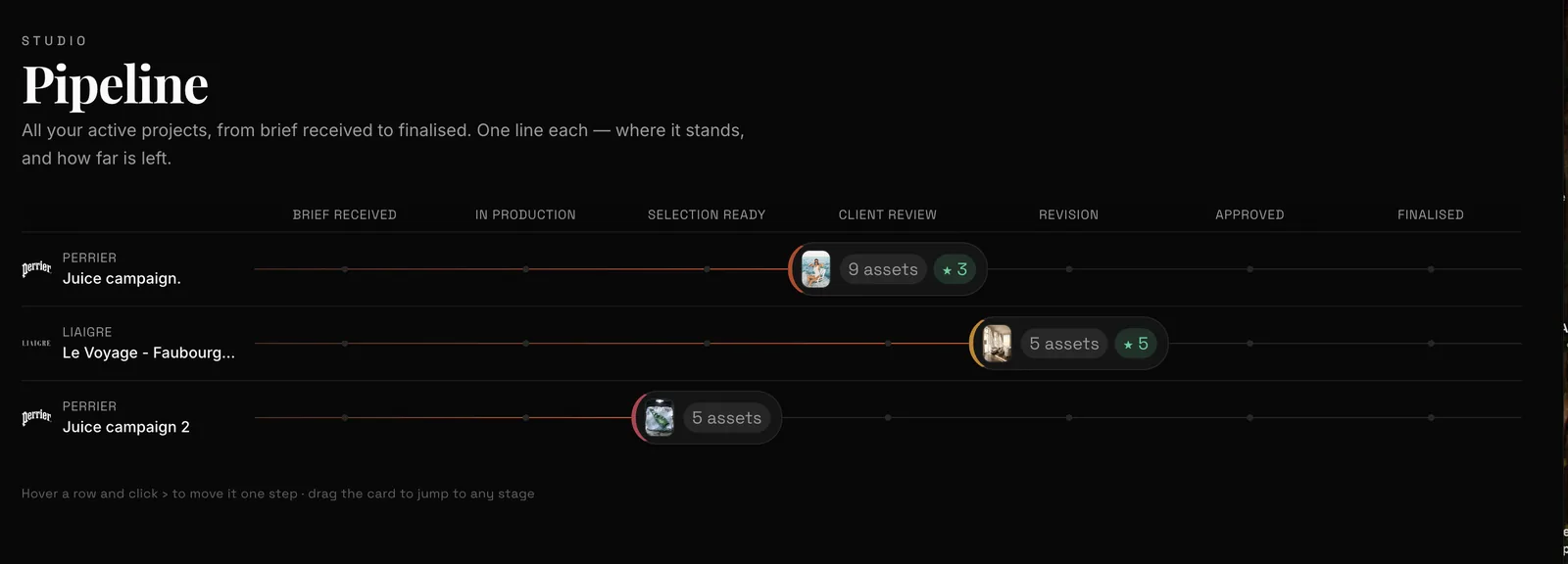
The difference shows after generation. Miravela sorts work by client and collection, keeps a shared selection, and sends the client to a private portal where the marketing lead reviews, comments and approves. Comments come back inside the platform rather than in email threads. Approved files are copied automatically to your own Google Drive. Agencies run one folder per brand, with roles and credit caps per member.

Krea's Enterprise tier offers audit logs, per-member spend limits and Slack Connect (Krea home page). Those cover internal governance well, but we found no client-facing review step on its published pages. If you check and find one, trust your own test over this page.
Miravela also keeps the prompt history of every visual and makes it exportable. Some brands need that to document their creative input. It never trains models on client content, and each workspace is isolated from the others.
Models: breadth versus curation
Krea's catalogue is larger. Its video line-up includes Veo 3.1, Kling, Hailuo, Wan and Runway, and its model library lists many more image and audio models. Its agent selects image, video and audio models for each step and reviews the results.
Miravela offers 12 models: Nano Banana 2, GPT Image 2, MAI Image 2.5, Seedream, Flux Pro, PixVerse C1, Veo 3.1, Kling, Grok Imagine 1.5, Wan 2.7, Seedance and Hailuo. It chooses per job and runs each at the model's maximum quality on every plan. A shorter list means fewer choices for the team to make. A longer list means more options to test. Neither is better in general.

What Miravela platform data says about turnaround
These figures come from Miravela's own database for the last 90 days, aggregated, with no client named. They cover 8,544 generations started and 8,079 completed (about 95%). GPT Image 2 had a median generation time of 95 seconds and a 95.9% completion rate. Nano Banana 2 had a median of 26 seconds. Seedance 2.0 had a median of 312 seconds, with 88.6% completed.
For an agency, this shapes the feedback loop. A round of stills takes minutes. A round of video takes noticeably longer, and roughly one video job in nine did not complete on that model. Build retries and waiting time into client deadlines, and ask any vendor, Krea included, how failed jobs are billed. Krea says failed or cancelled API jobs are not charged. We did not verify the same for its app plans.
Cost model
Krea bills in compute units, and how far they go depends on the model. For example, Krea estimates Pro's 20,000 units at about 257 Nano Banana 2 images or 83 Seedance 2.0 videos (Photta review). That cost structure suits teams who like to experiment. It makes budgeting harder when you quote a fixed price to a client.
Miravela uses credits in euros with no per-model surcharge. Studio is €199/month (self-serve), Signature is €490/month (adds your own branded instance and custom agents), and Enterprise is €1,790/month (adds an on-site partnership). All prices exclude VAT. Details are on the pricing page. Krea is cheaper to start with. Check its pricing page for current figures, because they change.
How to choose
- Decide whether your pain is making visuals or managing clients. Krea addresses the first; Miravela addresses both but is stronger on the second.
- Test one real brief on each tool, from brief to client sign-off, and count the tools you still need around it.
- Check whether clients must review inside the tool or whether email, Slack or a proofing tool is acceptable.
- List must-have features: real-time canvas, LoRA training, API, SSO, prompt-history export, EU data hosting.
- Compare cost at your real monthly volume, including video and retries, not at list price.
- Check contract terms: IP indemnification, training on your data, data location.
- Weigh maturity. Miravela is in beta; Krea is an established product with a large catalogue.
More on the agency workflow is on Miravela for agencies, and the model list is on the models page.
Questions
- Is Krea or Miravela better for agencies with many clients?
- It depends on the workflow. Krea suits agencies that mainly need a wide model catalogue, real-time ideation, LoRA training or an API, and it offers shared workspaces with roles and spend limits. Miravela suits agencies that want brief parsing, one folder per brand, private client approval portals and Drive delivery in one place, but it is in beta and has fewer models.
- Does Krea have a client approval portal?
- We found no client-facing review or approval portal on Krea's pricing, Business or Enterprise pages. Its published team features cover shared workspaces, roles, model access controls and spend limits. Miravela includes private client portals where comments and approvals come back inside the platform.
- Where is the data hosted for Miravela and Krea?
- Miravela hosts its data in the EU (Paris), though the models themselves run at their providers such as Google, OpenAI and ByteDance. One third-party review of Krea found no known dedicated EU hosting. Confirm current terms with Krea's sales team if data location matters to your clients.